6 Best Browser Games for Parents and Kids to Play Together
Discover six free browser games that parents and kids can enjoy together, from cooperative adventures and kitchen teamwork to puzzles, racing, and friendly competition.
A good family game does more than keep two people looking at the same screen. It gives them something to discuss, a simple way to share decisions, and enough room for both players to contribute. Browser games are particularly useful for this because they remove the usual setup. There is no large download, no disc to find, and no need to create a separate account before discovering whether a game suits your family.
The six games below support different ways of playing together. Some let two people use the same keyboard, while others work well when a parent and child take turns or make decisions as a team. Before beginning, check the controls, agree on how long the session will last, and let the younger player explore without turning every mistake into a lesson. The goal is shared play, not perfect play.
1. Fireboy Watergirl Island Survival 3: Solve Problems as a Team
Fireboy Watergirl Island Survival 3 is the clearest cooperative choice on this list. One player controls Fireboy with A, D, and W, while the other uses the arrow keys for Watergirl. Both characters must move through an island filled with hazards, and progress depends on keeping them safe together.
This setup encourages useful communication. Pause before a difficult section, decide which character should move first, and identify a safe waiting point for the other player. Parents can help by asking questions instead of giving every answer: Which route looks safer? What happens if one character jumps first? That keeps the child involved in solving the level rather than simply following instructions.
2. 2 Player Games Kids Kitchen: Share the Restaurant
2 Player Games Kids Kitchen turns cooking and restaurant tasks into a light cooperative activity. The controls use clicks or taps, making it approachable for children who are not comfortable with a full keyboard. Players can work through food preparation and service together, dividing small jobs as they go.
Use the kitchen theme to practice planning without making the session feel like homework. One person can watch the current order while the other handles the next action. Swap roles after each round so that the same player is not always directing. It is a friendly choice for younger children because the main pleasure comes from completing a process together.
3. Car Factory For Kids: Build First, Race Second
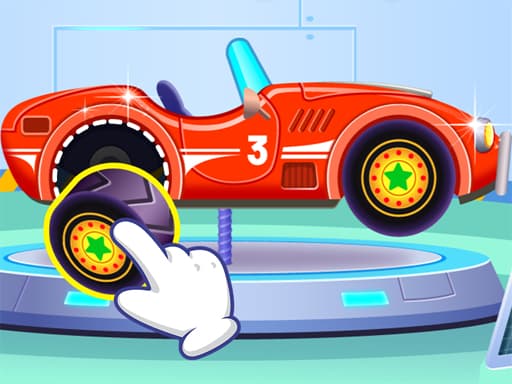
Car Factory For Kids combines a construction activity with a simple driving section. Players assemble a vehicle piece by piece and then take it onto the track. Keyboard controls use D to accelerate and W to brake, while mobile devices provide on-screen buttons.
The game works well for taking turns. One player can choose or assemble parts, and the other can drive the finished car. On the next attempt, reverse the roles. Parents can invite the child to predict how the vehicle will look before it is complete or choose a small racing goal, such as reaching the finish without rushing. The change from building to driving helps the session stay varied.
4. Animal Bubble Blast: Plan Each Shot Together
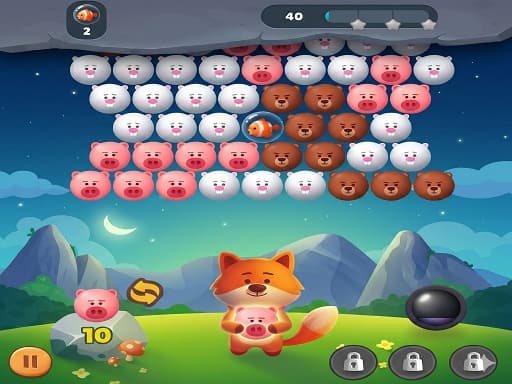
Animal Bubble Blast is a colorful bubble-matching puzzle controlled with a mouse or touch. The objective is easy to understand: aim at matching animal bubbles, clear groups, and use boosters when the board becomes difficult. Because there is no complicated movement to coordinate, two people can focus on discussing the next shot.
Let the child choose an initial target, then look together at what the move will open. If a shot fails, avoid immediately correcting it. Ask what changed on the board and which color now has the best path. This turns a straightforward puzzle into a shared exercise in prediction while keeping the pace relaxed.
5. 12 MiniBattles: Keep Competition Light
12 MiniBattles is built for two people at one keyboard. Player 1 uses A and Player 2 uses L, but the action connected to each button changes between mini-games. One round may involve sport, another may involve a duel, and the random rotation prevents either player from relying on one practiced routine.
Its greatest family advantage is the short round length. A loss is quickly replaced by a new challenge, so there is little time to dwell on the result. Set a simple rule before starting: play a fixed number of rounds, celebrate clever moments from both players, and avoid letting an experienced adult dominate every match. If the skill gap is large, the adult can use a non-dominant hand or give the child one practice round first.
6. Chess 3D: Slow the Session Down
Chess 3D offers a calmer alternative to the action games. Pieces are selected and moved with the mouse, and the 3D board gives families a familiar space for learning basic chess ideas. A parent can explain how a piece moves, but the child should still make the final decision.
For beginners, do not begin with the expectation of completing a serious match. Play with fewer pieces, focus on how pawns and rooks move, or set a small objective such as safely capturing one piece. Older children may enjoy a full game with a rule that each player explains one move they considered. The slower pace creates room for conversation that faster games do not.
Choose the Right Kind of Together
Cooperative games are usually the best starting point when a child is new to controls because both players win or lose together. Fireboy and Watergirl provides direct cooperation, while Kids Kitchen divides a shared process into manageable tasks. Car Factory and Animal Bubble Blast are useful for taking turns, and Chess 3D supports a quieter session. Choose 12 MiniBattles when both players are comfortable with friendly competition.
Age labels are only a starting point. Reading ability, coordination, sensitivity to failure, and previous experience matter more than a number. Test a game briefly before handing over the controls, keep the sound at a comfortable level, and use full-screen mode only after checking how to exit it. For younger children, an adult should remain present rather than treating the browser as automatic supervision.
Make a Short Session Feel Complete
Agree on a stopping point before play begins: finish two levels, build and race one car, or complete five mini-battles. A clear ending makes it easier to stop without an argument and gives the session a shape. When you finish, ask one simple question: Which part should we try differently next time?
The strongest family game is not necessarily the one with the most features. It is the one that helps both players participate. Start with a game that matches your child's current confidence, share decisions instead of taking over, and allow imperfect attempts to become the moments you remember.
Play Games From This Article
Try the games mentioned above directly in your browser—no download required.